NOTE: These are the old v1 & v2 Rack & TE symbols.
Please visit the
v3 page for updated product
and ordering info.
Use these Visio component stencils (also called shapes) to generate a professional looking system
block diagram with as much - or as little - detail as you like. These stencils are full-scale (1:1)
for easy modification! Simply choose one of the included instruments and modify the front panel to match
your instrument.
Built on the Visio grid to guarantee alignment. All components are original. This product has been tested with Visio versions 4.0 through 2002. Click
here to see known issues (minor) and how to fix.
- Click here
for EIA Tube Base stencils
- Click here for RF Block Diagram stencils
Sample Components
Here is a small sample of what you will be receiving. Note the consistent formatting. Edit values
the same convenient way as with all other Visio components.
 (O-Scope) |
 Full-Scale
Racks |

(Network Analyzer) |
 (DMM) |
 Blank Filler Panels |
 (Function
Generator) |
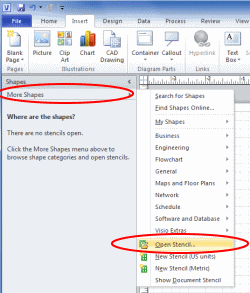
How to open these stencils in Visio 2010?
** Make certain that the Color Themes are set to "None" **
In Visio 2013, you will probably need to change the
File Block Settings that have been added in 2013 for security purposes. Please see
the Microsoft support page for detailed instructions on
File Block Settings (it's easy
to do).
|
 |
|