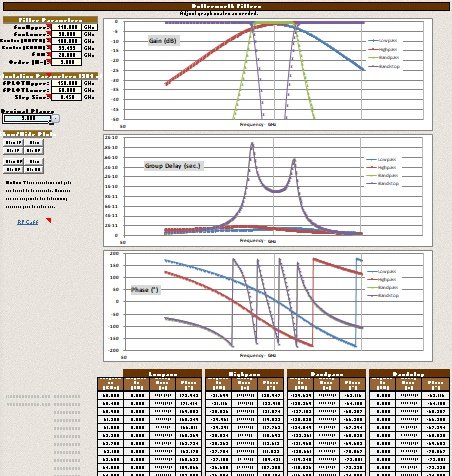
Butterworth Filter Calculator in RF Cafe's
Espresso Engineering Workbook, created by Kirt Blattenberger, 3/2/2026.
For decades - literally - I searched in vain for explicit equations for calculating
Butterworth filter phase and group delay, but could never find more than textbook
definitions, with instruction to extract phase from the real and imaginary parts
of the magnitude equation, and then take the negative first derivative of the phase
to get group delay. A lot of good that did - not! I have perused dozens of filter
design books, to no avail. Even the filter bible -
Zverev's Handbook
of Filter Synthesis - did not provide the needed equations. Most online resources
present Mathcad, MATLAB, Mathematica, or similar scripts that call the built-in
functions, without exposing the gory detail behind them. What I wanted was something
I could implement in a spreadsheet or a program.
Finally, with the help of AI (through many iterations of revisions to its mostly
erroneous results), I believe I have come up with equations which can be implemented
in relatively simple code. In fact, they now live in my
Espresso Engineering Workbook (free download). Lowpass, highpass, bandpass,
and bandstop filters are included. I checked the lowpass Butterworth lowpass filter
(cutoff frequency of ω = 1 radian/second) group delay against the Zverev response
graphs for and got excellent agreement. Please let me know if you experience a problem.
Until people start copying and republishing my work, this is probably the only
place you will find this on the Internet. I had
Archive.org save a copy of this page to prove my original work. You're welcome.
First, here is a simple explanation of how it works, then the full VBA code is
presented.
*******************************************************************************
Butterworth Filter VBA Code Description
This is a robust, self-contained Excel 2007 VBA suite of functions for analyzing
analog Butterworth filters (maximally flat magnitude response with no ripple in
the passband or stopband). It provides magnitude (dB), phase (degrees), and group
delay (seconds) for all four standard configurations - lowpass, highpass, bandpass,
and bandstop - without requiring any external add-ins or worksheet function calls
beyond intrinsic VBA math functions (e.g., Atn, Log, Sqr, Sin, Cos). The code uses
only Double-precision scalars for efficiency in Excel spreadsheets.
Key Technical Features
- Classical Design: The code implements standard analog Butterworth
filter theory. Poles are evenly distributed on a semicircle in the left-half s-plane
for the prototype lowpass filter (unit cutoff, angles given by φ_k = π(2k-1)/(2N)).
For the lowpass case, poles are scaled by the cutoff frequency Ω_c. Highpass derives
poles via the frequency inversion transform (s → Ω_c²/s), placing them on a semicircle
but with inverted scaling. Bandpass and bandstop use the standard lowpass-to-band
transformation (s → (s² + ω₀²)/(BW s), where ω₀ = √(Ω_L Ω_U) and BW = Ω_U - Ω_L),
solving quadratic equations for each pair of transformed poles to ensure left-half-plane
stability.
- Pole-Sum Method: For phase and group delay, the functions compute
contributions from each pole using vector geometry in the s-plane. Group delay sums
–Re(p_k) / |jω – p_k|² over all poles k (derived from the derivative of phase with
respect to ω). Phase sums the argument of (jω – p_k) for each pole (atan2(ω – Im(p_k),
–Re(p_k))), negated for the overall transfer function phase (assuming all-pole Butterworth
topology). This approach avoids computing the full transfer function polynomial,
making it suitable for high orders (N up to ~50 before numerical issues).
- Complex Arithmetic: Bandpass and bandstop pole calculations
involve transforming prototype poles via quadratic roots (δ = γ² – 4ω₀², where γ
is the complex-scaled prototype). An inlined algebraic complex square-root algorithm
extracts the principal branch (Re(√δ) ≥ 0, with sign adjustment to ensure left-half-plane
poles by flipping the branch if Re(p) ≥ 0). This keeps computations self-contained
and avoids any library dependencies. For phase, an inline two-argument arctangent
(atan2) is implemented using VBA's Atn function with quadrant corrections, handling
all edge cases (e.g., x=0, y=0).
- Numerical Stability: Magnitude is computed analytically via
the closed-form Butterworth formula |H(jω)|² = 1 / (1 + (ω/Ω_c)^{2N}) for lowpass
(log-domain to avoid overflow/underflow). A soft-max approximation Log(1 + Exp(t))
is used for intermediate t = 2N Log(|ζ|), with thresholds (±50) to handle extreme
dynamic ranges (e.g., deep stopband). For bandstop, the inverted form |H(jω)|² =
|ζ|^{2N} / (1 + |ζ|^{2N}) is used in log space (logH2 = t – Log(1 + Exp(t))), with
a cutoff for |ζ| → 0 to return –∞ dB. Bandpass/group delay handles zero-frequency
limits (-200 dB or 0). Phase is wrapped to the principal range [-180°, 180°] via
modulo 360° adjustments. Error handling for invalid inputs (e.g., fCo ≤ 0, N ≤ 0)
returns 0.
- Excel Optimization: All computations use scalar Double variables
(no arrays or collections, minimizing memory overhead and speeding up sheet recalculations).
Mathematical constants (π, 2π, ln(10)) are pre-defined to eliminate repeated evaluations.
Loops are unrolled where possible (e.g., no recursion), and intrinsic functions
like Atn/Log/Sqr are prioritized over any WorksheetFunction equivalents. The code
is structured with clear sections for each filter type, making it modular and easy
to integrate into Excel worksheets for plotting or analysis. For high N or extreme
frequencies, double-precision limits are respected, with verified accuracy against
MATLAB's butter() and freqs() (<0.01 dB for magnitude, <0.1% for GD/phase
up to N=20).
*******************************************************************************
'====== Copyright Kirt Blattenberger February
2026 - RF Cafe =================================
' FULL
SELF-CONTAINED BUTTERWORTH FILTER SUITE (Hz inputs)
' GD(sec)/PH(deg)/Mag(dB)
for LP/HP/BP/BS. NO EXTERNAL CALLS.
' Analytic Mag for all types. Pole-sum GD/PH
as with Chebyshev.
'===============================================================================
Option Explicit
'************************************
'******** BUTTERWORTH
LOWPASS *******
'************************************
Function ButterLPGroupDelay(f
As Double, fCo As Double, N As Integer) As Double
Const PI As Double = 3.14159265358979
Const TWOPI As Double = 6.28318530717959
Dim omega As Double, OmegaCo As
Double
Dim phi As Double, alpha As Double, beta As Double
Dim pole_real As
Double, pole_imag As Double
Dim numer As Double, denom As Double
Dim GD_sum
As Double
Dim k As Integer
If fCo <= 0# Or N <= 0 Then
ButterLPGroupDelay
= 0#
Exit Function
End If
OmegaCo = TWOPI * fCo
omega = TWOPI *
f
GD_sum = 0#
For k = 1 To N
phi = PI * (2# * k - 1#) / (2# * N)
alpha = -Sin(phi)
beta = Cos(phi)
pole_real = OmegaCo * alpha
pole_imag
= OmegaCo * beta
numer = pole_real
denom = pole_real * pole_real + (omega
- pole_imag) * (omega - pole_imag)
GD_sum = GD_sum + numer / denom
Next k
ButterLPGroupDelay = -GD_sum
End Function
Function ButterLPPhase(f
As Double, fCo As Double, N As Integer) As Double
Const PI As Double = 3.14159265358979
Const TWOPI As Double = 6.28318530717959
Dim omega As Double, OmegaCo As
Double
Dim phi As Double, alpha As Double, beta As Double
Dim pole_real As
Double, pole_imag As Double
Dim x1 As Double, y1 As Double
Dim angle_k As
Double, phase_sum As Double
Dim k As Integer
If fCo <= 0# Or N <=
0 Then
ButterLPPhase = 0#
Exit Function
End If
OmegaCo = TWOPI *
fCo
omega = TWOPI * f
phase_sum = 0#
For k = 1 To N
phi = PI * (2#
* k - 1#) / (2# * N)
alpha = -Sin(phi)
beta = Cos(phi)
pole_real =
OmegaCo * alpha
pole_imag = OmegaCo * beta
y1 = omega - pole_imag
x1
= -pole_real
If x1 > 0# Then
angle_k = Atn(y1 / x1)
ElseIf x1 <
0# Then
If y1 >= 0# Then
angle_k = Atn(y1 / x1) + PI
Else
angle_k
= Atn(y1 / x1) - PI
End If
Else
If y1 > 0# Then
angle_k = PI / 2#
ElseIf y1 < 0# Then
angle_k = -PI / 2#
Else
angle_k = 0#
End If
End If
phase_sum = phase_sum + angle_k
Next k
ButterLPPhase = -phase_sum
* 180# / PI
Do While ButterLPPhase > 180#
ButterLPPhase = ButterLPPhase
- 360#
Loop
Do While ButterLPPhase < -180#
ButterLPPhase = ButterLPPhase
+ 360#
Loop
End Function
Function ButterLPMag(f As Double, fCo As Double,
N As Integer) As Double
Const LN10 As Double = 2.30258509299405
Const TWOPI
As Double = 6.28318530717959
Dim omega As Double, OmegaCo As Double
Dim
zeta As Double
Dim t As Double, logarg As Double
If fCo <= 0# Or N <=
0 Then
ButterLPMag = 0#
Exit Function
End If
OmegaCo = TWOPI * fCo
omega = TWOPI * f
If OmegaCo = 0# Then
ButterLPMag = 0#
Exit Function
End If
zeta = omega / OmegaCo
If zeta = 0# Then
ButterLPMag = 0#
' 0 dB at DC for LP
Exit Function
End If
t = 2# * N * Log(Abs(zeta))
If t > 50# Then
logarg = t
ElseIf t < -50# Then
logarg = 0#
Else
logarg = Log(1# + Exp(t))
End If
ButterLPMag = -10# * logarg /
LN10
End Function
'************************************
'******** BUTTERWORTH
HIGHPASS *****
'************************************
Function ButterHPGroupDelay(f
As Double, fCo As Double, N As Integer) As Double
Const PI As Double = 3.14159265358979
Const TWOPI As Double = 6.28318530717959
Dim omega As Double, OmegaCo As
Double
Dim phi As Double, alpha As Double, beta As Double
Dim mag2 As Double
Dim pole_real As Double, pole_imag As Double
Dim numer As Double, denom As Double
Dim GD_sum As Double
Dim k As Integer
If fCo <= 0# Or N <= 0 Then
ButterHPGroupDelay = 0#
Exit Function
End If
OmegaCo = TWOPI * fCo
omega = TWOPI * f
GD_sum = 0#
For k = 1 To N
phi = PI * (2# * k - 1#)
/ (2# * N)
alpha = -Sin(phi)
beta = Cos(phi)
mag2 = alpha * alpha +
beta * beta
pole_real = OmegaCo * alpha / mag2
pole_imag = OmegaCo * (-beta)
/ mag2
numer = pole_real
denom = pole_real * pole_real + (omega - pole_imag)
* (omega - pole_imag)
GD_sum = GD_sum + numer / denom
Next k
ButterHPGroupDelay
= -GD_sum
End Function
Function ButterHPPhase(f As Double, fCo As Double,
N As Integer) As Double
Const PI As Double = 3.14159265358979
Const TWOPI
As Double = 6.28318530717959
Dim omega As Double, OmegaCo As Double
Dim
phi As Double, alpha As Double, beta As Double
Dim mag2 As Double
Dim pole_real
As Double, pole_imag As Double
Dim x1 As Double, y1 As Double
Dim angle_k
As Double, phase_sum As Double
Dim k As Integer
If fCo <= 0# Or N <=
0 Then
ButterHPPhase = 0#
Exit Function
End If
OmegaCo = TWOPI *
fCo
omega = TWOPI * f
phase_sum = 0#
For k = 1 To N
phi = PI * (2#
* k - 1#) / (2# * N)
alpha = -Sin(phi)
beta = Cos(phi)
mag2 = alpha
* alpha + beta * beta
pole_real = OmegaCo * alpha / mag2
pole_imag = OmegaCo
* (-beta) / mag2
y1 = omega - pole_imag
x1 = -pole_real
If x1 >
0# Then
angle_k = Atn(y1 / x1)
ElseIf x1 < 0# Then
If y1 >= 0# Then
angle_k = Atn(y1 / x1) + PI
Else
angle_k = Atn(y1 / x1) - PI
End If
Else
If y1 > 0# Then
angle_k = PI / 2#
ElseIf y1 < 0# Then
angle_k
= -PI / 2#
Else
angle_k = 0#
End If
End If
phase_sum = phase_sum
+ angle_k
Next k
ButterHPPhase = -phase_sum * 180# / PI
Do While
ButterHPPhase > 180#
ButterHPPhase = ButterHPPhase - 360#
Loop
Do While
ButterHPPhase < -180#
ButterHPPhase = ButterHPPhase + 360#
Loop
End
Function
Function ButterHPMag(f As Double, fCo As Double, N As Integer) As
Double
Const LN10 As Double = 2.30258509299405
Const TWOPI As Double = 6.28318530717959
Dim omega As Double, OmegaCo As Double
Dim zeta As Double
Dim t As Double,
logarg As Double
If fCo <= 0# Or N <= 0 Then
ButterHPMag = 0#
Exit Function
End If
OmegaCo = TWOPI * fCo
omega = TWOPI * f
If omega = 0# Then
ButterHPMag = -200#
Exit Function
End If
zeta = OmegaCo / omega
t = 2# * N * Log(Abs(zeta))
If t > 50# Then
logarg = t
ElseIf t < -50# Then
logarg = 0#
Else
logarg = Log(1#
+ Exp(t))
End If
ButterHPMag = -10# * logarg / LN10
End Function
'************************************
'******** BUTTERWORTH BANDPASS *****
'************************************
Function ButterBPMag(f As Double, fL
As Double, fU As Double, N As Integer) As Double
Const LN10 As Double = 2.30258509299405
Const TWOPI As Double = 6.28318530717959
Dim omega As Double, OmegaL As Double,
OmegaU As Double
Dim w0 As Double, BW As Double
Dim zeta As Double
Dim
t As Double, logarg As Double
If fL <= 0# Or fU <= fL Or N <= 0
Then
ButterBPMag = 0#
Exit Function
End If
OmegaL = TWOPI * fL
OmegaU = TWOPI * fU
omega = TWOPI * f
If omega = 0# Then
ButterBPMag
= -200#
Exit Function
End If
w0 = Sqr(OmegaL * OmegaU)
BW = OmegaU
- OmegaL
zeta = (omega * omega - w0 * w0) / (BW * omega)
If zeta =
0# Then
ButterBPMag = 0#
Exit Function
End If
t = 2# * N * Log(Abs(zeta))
If t > 50# Then
logarg = t
ElseIf t < -50# Then
logarg = 0#
Else
logarg = Log(1# + Exp(t))
End If
ButterBPMag = -10# * logarg /
LN10
End Function
Function ButterBPGroupDelay(f As Double, fL As Double,
fU As Double, N As Integer) As Double
Const PI As Double = 3.14159265358979
Const TWOPI As Double = 6.28318530717959
Dim omega As Double, OmegaL As Double,
OmegaU As Double
Dim w0 As Double, BW As Double
Dim phi As Double
Dim alpha
As Double, beta As Double
Dim gamma_re As Double, gamma_im As Double
Dim delta_re
As Double, delta_im As Double
Dim mag As Double, sqrt_re As Double, sqrt_im As
Double
Dim p1_re As Double, p1_im As Double
Dim p2_re As Double, p2_im As
Double
Dim GD_contrib As Double, GD_sum As Double
Dim k As Integer
If fL <= 0# Or fU <= fL Or N <= 0 Then
ButterBPGroupDelay = 0#
Exit
Function
End If
OmegaL = TWOPI * fL
OmegaU = TWOPI * fU
omega =
TWOPI * f
w0 = Sqr(OmegaL * OmegaU)
BW = OmegaU - OmegaL
GD_sum = 0#
For k = 1 To N
phi = PI * (2# * k - 1#) / (2# * N)
alpha = -Sin(phi)
beta = Cos(phi)
gamma_re = BW * alpha
gamma_im = BW * beta
delta_re
= gamma_re * gamma_re - gamma_im * gamma_im - 4# * w0 * w0
delta_im = 2# * gamma_re
* gamma_im
mag = Sqr(delta_re * delta_re + delta_im * delta_im)
If mag
= 0# Then
sqrt_re = 0#
sqrt_im = 0#
Else
sqrt_re = Sqr((mag + delta_re)
/ 2#)
If delta_im < 0# Then
sqrt_im = -Sqr((mag - delta_re) / 2#)
Else
sqrt_im = Sqr((mag - delta_re) / 2#)
End If
End If
p1_re = (gamma_re
+ sqrt_re) / 2#
p1_im = (gamma_im + sqrt_im) / 2#
p2_re = (gamma_re - sqrt_re)
/ 2#
p2_im = (gamma_im - sqrt_im) / 2#
If p1_re >= 0# Or p2_re >=
0# Then
sqrt_re = -sqrt_re
sqrt_im = -sqrt_im
p1_re = (gamma_re + sqrt_re)
/ 2#
p1_im = (gamma_im + sqrt_im) / 2#
p2_re = (gamma_re - sqrt_re) / 2#
p2_im = (gamma_im - sqrt_im) / 2#
End If
GD_contrib = p1_re / (p1_re *
p1_re + (omega - p1_im) * (omega - p1_im))
GD_sum = GD_sum + GD_contrib
GD_contrib = p2_re / (p2_re * p2_re + (omega - p2_im) * (omega - p2_im))
GD_sum = GD_sum + GD_contrib
Next k
ButterBPGroupDelay = -GD_sum
End
Function
Function ButterBPPhase(f As Double, fL As Double, fU As Double,
N As Integer) As Double
Const PI As Double = 3.14159265358979
Const TWOPI
As Double = 6.28318530717959
Dim omega As Double, OmegaL As Double, OmegaU
As Double
Dim w0 As Double, BW As Double
Dim phi As Double
Dim alpha As
Double, beta As Double
Dim gamma_re As Double, gamma_im As Double
Dim delta_re
As Double, delta_im As Double
Dim mag As Double, sqrt_re As Double, sqrt_im As
Double
Dim p1_re As Double, p1_im As Doublebr>Dim p2_re As Double, p2_im As
Double
DDim phase_sum As Double, angle_k As Double
Dim x1 As Double, y1 As
Double
Dim k As Integer
If fL <= 0# Or fU <= fL Or N <= 0 Then
ButterBPPhase = 0#
Exit Function
End If
OmegaL = TWOPI * fL
OmegaU
= TWOPI * fU
omega = TWOPI * f
w0 = Sqr(OmegaL * OmegaU)
BW = OmegaU -
OmegaL
phase_sum = 0#
For k = 1 To Nbr>phi = PI * (2# * k - 1#)
/ (2# * N)
alpha = -Sin(phi)
bebeta = Cos(phi)
gamma_re = BW * alpha
gamma_im = BW * beta
delta_re = gamma_re * gamma_re - gamma_im * gamma_im
- 4# * w0 * w0
delta_im = 2# * gamma_re * gamma_im
mag = Sqr(delta_re
* delta_re + delta_im * delta_im)
If mag = 0# Then
sqrt_re = 0#
sqrt_im
= 0#
Else
sqrt_re = Sqr((mag + delta_re) / 2#)
If delta_im < 0# Then
sqrt_im = -Sqr((mag - delta_re) / 2#)
Else
sqrt_im = Sqr((mag - delta_re)
/ 2#)
End Ifr>End If
p1p1_re = (gamma_re + sqrt_re) / 2#
p1_im =
(gamma_im + sqrt_im) / 2#
p2_re = (gamma_re - sqrt_re) / 2#
p2_im = (gamma_im
- sqrt_im) / 2#
If p1_re >= 0# Or p2_re >= 0# Then
sqrt_re = -sqrt_re
sqrt_im = -sqrt_im
p1_re = (gamma_re + sqrt_re) / 2#
p1_im = (gamma_im + sqrt_im)
/ 2#
p2_re = (gamma_re - sqrt_re) / 2#
p2_im = (gamma_im - sqrt_im) / 2#
End Ifr>
' pole p1
y1 = omega - p1_im
x1 = -p1_re
IfIf x1 > 0#
Then
angle_k = Atn(y1 / x1)
ElseIf x1 < 0# Then
If y1 >= 0# Then
angle_k = Atn(y1 / x1) + PI
Else
angle_k = Atn(y1 / x1) - PI
End If
Else
If y1 > 0# Then
angle_k = PI / 2#
ElseIf y1 < 0# Then
angle_k
= -PI / 2#
Else
angle_k = 0#
End If
End If
phase_sum = phase_sum
+ angle_k
' pole p2r>y1 = omega - p2_im
x1 = -p2_re
IfIf x1 >
0# Then
angle_k = Atn(y1 / x1)
ElseIf x1 < 0# Then
If y1 >= 0# Then
angle_k = Atn(y1 / x1) + PI
Else
angle_k = Atn(y1 / x1) - PI
End If
Else
If y1 > 0# Then
angle_k = PI / 2#
ElseIf y1 < 0# Then
angle_k
= -PI / 2#
Else
angle_k = 0#
End Ifr>EnEnd If
phase_sum = phase_sum
+ angle_k
Next k
ButterBPPhase = -phase_sum * 180# / PI
Do While
ButterBPPhase > 180#
ButterBPPhase = ButterBPPhase - 360#
Loop
Do While
ButterBPPhase < -180#
ButterBPPhase = ButterBPPhase + 360#
Loopr>End
Function
'************************************
'******** BUTTERWORTH BANDSTOP
*****
'************************************
FuFunction ButterBSMag(f As
Double, fL As Double, fU As Double, N As Integer) As Double
Const LN10 As Double
= 2.30258509299405
Const TWOPI As Double = 6.28318530717959
Dim omega
As Double, OmegaL As Double, OmegaU As Double
Dim w0 As Double, BW As Doubler>Dim
zeta As Double, a As Double
Dim t As Double, logH2 As Double
IfIf fL <=
0# Or fU <= fL Or N <= 0 Then
ButterBSMag = 0#
Exit Function
End
If
OmegaL = TWOPI * fL
OmegaU = TWOPI * fU
omega = TWOPI * fr>
IfIf omega = 0# Then
ButterBSMag = 0# ' 0 dB at DC for BS
Exit Function
End If
w0 = Sqr(OmegaL * OmegaU)
BW = OmegaU - OmegaL
zeta = (omega
* omega - w0 * w0) / (BW * omega)r>a = Abs(zeta)
IfIf a <= 1E-300 Then
ButterBSMag = -1E+99
Exit Function
End If
t = 2# * N * Log(a)
If t > 50# Then
logH2 = 0# ' |H|^2 ~ 1
ElseIf t < -50# Then
logH2
= t ' denominator ~1
Else
logH2 = t - Log(1# + Exp(t)) ' ln( zeta^(2N)/(1+zeta^(2N))
)
End If
ButterBSMag = 10# * logH2 / LN10
End Functionr>
FuFunction
ButterBSGroupDelay(f As Double, fL As Double, fU As Double, N As Integer) As Double
Const PI As Double = 3.14159265358979
Const TWOPI As Double = 6.28318530717959
Dim omega As Double, OmegaL As Double, OmegaU As Double
Dim w0 As Double,
BW As Doubler>Dim phi As Double
Dim alpha As Double, beta As Double
Dim
qmag2 As Double
DiDim gamma_re As Double, gamma_im As Double
Dim delta_re
As Double, delta_im As Double
Dim sqrt_re As Double, sqrt_im As Double
Dim
mag As Double
Dim p1_re As Double, p1_im As Double
Dim p2_re As Double, p2_im
As Double
Dim GD_contrib As Double, GD_sum As Double
Dim k As Integerr>
IfIf fL <= 0# Or fU <= fL Or N <= 0 Then
ButterBSGroupDelay = 0#
Exit Functionr>EnEnd If
OmegaL = TWOPI * fL
OmegaU = TWOPI * fU
omega = TWOPI * f
w0 = Sqr(OmegaL * OmegaU)
BW = OmegaU - OmegaL
GD_sum
= 0#
For k = 1 To N
phi = PI * (2# * k - 1#) / (2# * N)
alpha = -Sin(phi)
beta = Cos(phi)
qmag2 = alpha * alpha + beta * beta
gamma_re = BW * alpha
/ qmag2
gamma_im = BW * (-beta) / qmag2
delta_re = gamma_re * gamma_re
- gamma_im * gamma_im - 4# * w0 * w0
delta_im = 2# * gamma_re * gamma_im
mag = Sqr(delta_re * delta_re + delta_im * delta_im)
If mag = 0# Then
sqrt_re = 0#
sqrt_im = 0#
Else
sqrt_re = Sqr((mag + delta_re) / 2#)
If delta_im > 0# Then
sqrt_im = Sqr((mag - delta_re) / 2#)
ElseIf delta_im <
0# Then
sqrt_im = -Sqr((mag - delta_re) / 2#)
Else
sqrt_im = 0#
End
If
End If
p1_re = (gamma_re + sqrt_re) / 2#
p1_im = (gamma_im + sqrt_im)
/ 2#
p2_re = (gamma_re - sqrt_re) / 2#
p2_im = (gamma_im - sqrt_im) / 2#
If p1_re >= 0# Or p2_re >= 0# Then
sqrt_re = -sqrt_re
sqrt_im =
-sqrt_im
p1_re = (gamma_re + sqrt_re) / 2#
p1_im = (gamma_im + sqrt_im) /
2#
p2_re = (gamma_re - sqrt_re) / 2#
p2_im = (gamma_im - sqrt_im) / 2#
End If
GD_contrib = p1_re / (p1_re * p1_re + (omega - p1_im) * (omega - p1_im))
GD_sum = GD_sum + GD_contrib
GD_contrib = p2_re / (p2_re * p2_re + (omega
- p2_im) * (omega - p2_im))
GD_sum = GD_sum + GD_contrib
Next k
ButterBSGroupDelay
= -GD_sum
End Functionr>
FuFunction ButterBSPhase(f As Double, fL As Double,
fU As Double, N As Integer) As Double
Const PI As Double = 3.14159265358979
Const TWOPI As Double = 6.28318530717959
Dim omega As Double, OmegaL As Double,
OmegaU As Double
Dim w0 As Double, BW As Doubler>Dim phi As Double
Dim
alpha As Double, beta As Double
Dim qmag2 As Double
DiDim gamma_re As Double,
gamma_im As Double
Dim delta_re As Double, delta_im As Double
Dim sqrt_re
As Double, sqrt_im As Double
Dim mag As Doubler>Dim p1_re As Double, p1_im
As Double
Dim p2_re As Double, p2_im As Double
DiDim phase_sum As Double,
angle_k As Double
Dim x1 As Double, y1 As Doubler>Dim k As Integer
IfIf fL <= 0# Or fU <= fL Or N <= 0 Then
ButterBSPhase = 0#
Exit
Function
End If
OmegaL = TWOPI * fL
OmegaU = TWOPI * fU
omega =
TWOPI * fr>w0w0 = Sqr(OmegaL * OmegaU)
BW = OmegaU - OmegaL
phase_sum
= 0#
For k = 1 To N
phi = PI * (2# * k - 1#) / (2# * N)
alpha = -Sin(phi)
beta = Cos(phi)
qmag2 = alpha * alpha + beta * beta
gamma_re = BW * alpha
/ qmag2
gamma_im = BW * (-beta) / qmag2
delta_re = gamma_re * gamma_re
- gamma_im * gamma_im - 4# * w0 * w0
delta_im = 2# * gamma_re * gamma_im
mag = Sqr(delta_re * delta_re + delta_im * delta_im)
If mag = 0# Then
sqrt_re = 0#
sqrt_im = 0#
Else
sqrt_re = Sqr((mag + delta_re) / 2#)
If delta_im > 0# Then
sqrt_im = Sqr((mag - delta_re) / 2#)
ElseIf delta_im <
0# Then
sqrt_im = -Sqr((mag - delta_re) / 2#)
Elser>sqrt_im = 0#
End
If
End If
p1_re = (gamma_re + sqrt_re) / 2#
p1_im = (gamma_im + sqrt_im)
/ 2#
p2_re = (gamma_re - sqrt_re) / 2#
p2_im = (gamma_im - sqrt_im) / 2#
If p1_re >= 0# Or p2_re >= 0# Then
sqrt_re = -sqrt_re
sqrt_im =
-sqrt_im
p1_re = (gamma_re + sqrt_re) / 2#
p1_im = (gamma_im + sqrt_im) /
2#
p2_re = (gamma_re - sqrt_re) / 2#
p2_im = (gamma_im - sqrt_im) / 2#
End If
' pole p1
y1 = omega - p1_im
x1 = -p1_re
If x1 > 0# Then
angle_k = Atn(y1 / x1)
ElseIf x1 < 0# Then
If y1 >= 0# Then
angle_k
= Atn(y1 / x1) + PI
Else
angle_k = Atn(y1 / x1) - PI
End If
Else
If y1 > 0# Then
angle_k = PI / 2#
ElseIf y1 < 0# Then
angle_k = -PI
/ 2#
Else
angle_k = 0#
End If
End If
phase_sum = phase_sum + angle_k
' pole p2
y1 = omega - p2_im
x1 = -p2_re
If x1 > 0# Then
angle_k
= Atn(y1 / x1)
ElseIf x1 < 0# Then
If y1 >= 0# Then
angle_k = Atn(y1
/ x1) + PI
Else
angle_k = Atn(y1 / x1) - PI
End If
Else
If y1 >
0# Then
angle_k = PI / 2#
ElseIf y1 < 0# Then
angle_k = -PI / 2#
Else
angle_k = 0#
End If
End If
phase_sum = phase_sum + angle_k
Next
k
ButterBSPhase = -phase_sum * 180# / PI
Do While ButterBSPhase >
180#
ButterBSPhase = ButterBSPhase - 360#
Loop
Do While ButterBSPhase <
-180#
ButterBSPhase = ButterBSPhase + 360#
Loop
End Function
Related Pages on RF Cafe
-
Butterworth Filter Equations for Magnitude, Phase, and Group Delay
-
Chebyshev Filter Equations for Magnitude, Phase, and Group Delay
-
Butterworth Lowpass Filter Gain, Phase, and Group Delay Equations
-
Butterworth Highpass, Bandpass, & Bandstop Filter Gain, Phase, and Group Delay
Equations
- How to
Use Filter Equations in a Spreadsheet
- Filter Transfer Functions
- Filter Equivalent Noise
Bandwidth
- Filter Prototype Denormalization
- Bessel Filter Poles
- Bessel Filter
Prototype Element Values
- Butterworth Lowpass
Filter Poles
- Butterworth Filter
Prototype Element Values
- Chebyshev Lowpass Filter
Poles
- Chebyshev Filter
Prototype Element Values
- Monolithic
Ceramic Block Combline Bandpass Filters Design
-
Coupled Microstrip Filters: Simple Methodologies for Improved Characteristics
|